You: real work Centient: paperwork
What good is a computer if not to do your paperwork
Desktop app · Employee app · Free · Pay once to lodge
You do jobs, the ATO does you, we ease the pain
A week in
the life
Here are the things you will be doing in a typical week with Centient
Effortlessly
Precise Quotes
Almost all the effort you put into Centient is in generating quotes. As it should be. A good quote contains most of the information about what your business will be doing. It's a prediction. The rest of what you do with Centient should just be confirmation and correction.
- All your suppliers catalogs are ready to pick from
- Markup rate automatically applied to supplier catalogs. Defaults to 10%.
- Real units with automatic conversion. So you can buy by the drum and sell by the litre.
- Purchase orders are derived from quotes
- Drafts the email to your client for you
Manage
The Job
A quote, when accepted, becomes a 'Job'; allowing you to assign employees and purchases to it
- Site address and employee locations shown on a map
- Job specific notepad
- Track job expenses and generate progress payment invoice on demand
Expenseless
Expenses
Recording expenses is easy, no matter the scenario, and in every scenario items are matched to the supplier's catalog for maximum precision
- Emailed invoices are handled automatically
- Paper invoices are scanned on the phone app
- Purchase orders are derived from sales invoices as easily as in the video to the right
Painless
Payday
Employees log their hours on their phone, you just review them. Then one click sends them to the ATO and another handles payment to them and their super fund.
- Crew log hours on their phone
- Payruns are generated automatically. You just check and submit
BSLess
BAS
You've already recorded your activity. So like payday it's just a matter of hitting the submit and pay button
- Pre fills your fuel tax credit claim from sales and purchase invoices
- If you forget to run payroll first, don't worry it'll tell you
Have your cake
And eat it too
The best thing about being an employee is you get to focus on what you're good at. The best thing about being self employed is you get to see the customer react to your work. The goal of Centient is to give you the best of both worlds. Here are some of the ways we deliver on that goal.
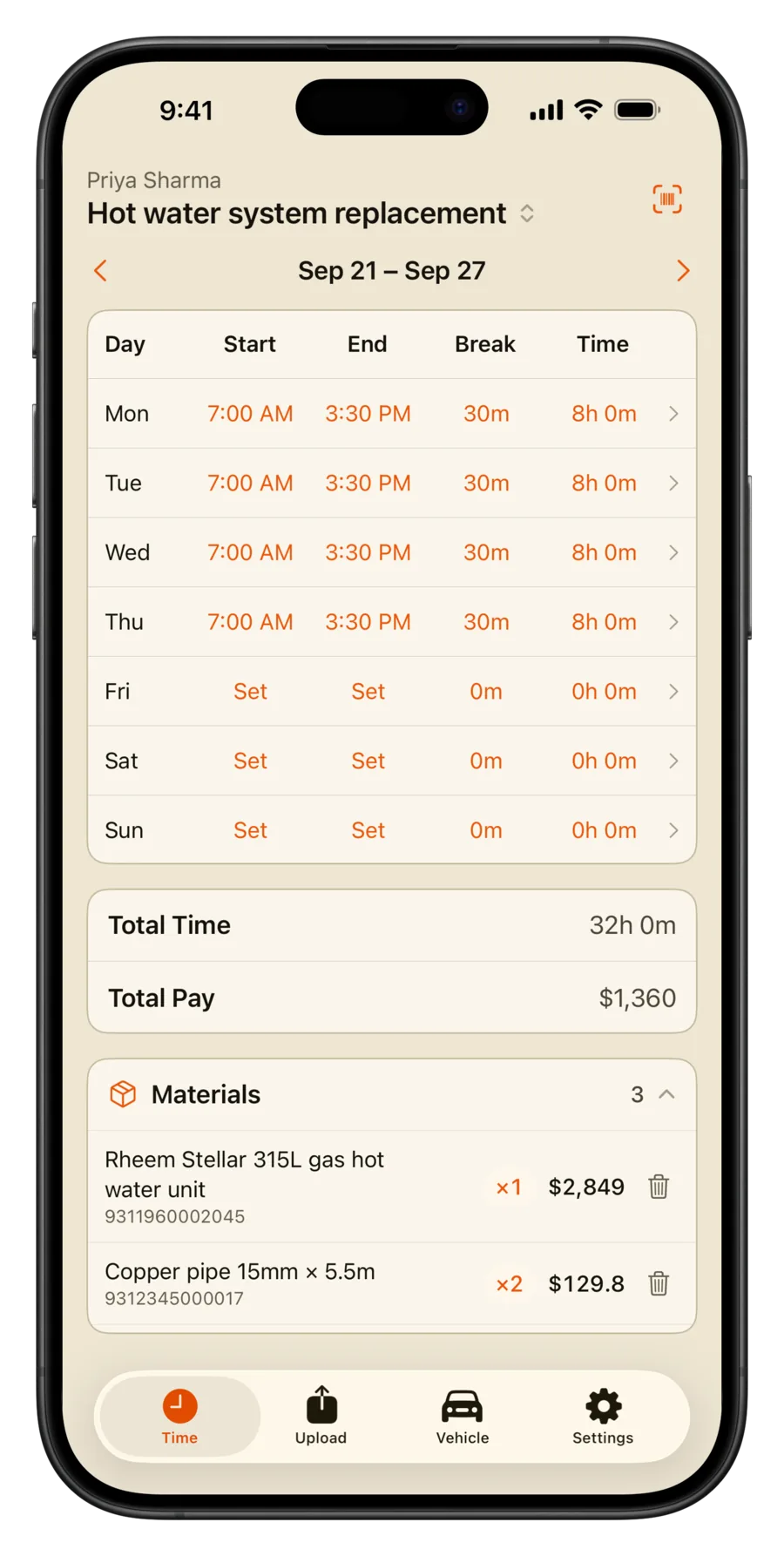
Employees submit timesheets from their phone
They can also enter purchase invoices just by taking a photo of the tax invoice. They can also log kms if they have a vehicle assigned to them and request leave.

Logbook the ATO wants
Nothing is more asinine than logging every trip you take in your vehicle just to determine the split between personal and business use. Lucky for you Centient specializes in asinine tasks. It knows where your jobs and suppliers are so it can infer your trips. Any leftover kms you do are assumed to be personal use.
All your suppliers catalogs
Centient has access to supplier catalogs that are often better than what the suppliers themselves offer. All items are described with minimal marketing fluff and the price and unit of sale are right there.
Keep track of your personal finances too
Feel free to put personal expenses on the company card. Centient makes it easy to separate them later. The personal finances section also makes it easy to mark expenses as employment related and see what your tax return will be.

Buy in one unit, sell in another
Centient understands units and packaging and knows how to convert between them. So you can buy a roll, drum, sheet, or length and sell a metre, litre, m², or inch. And when generating purchase orders Centient will automatically round to the nearest unit of sale.
Type math directly
Saves you from typing some math into a calculator only to copy the result over. Anywhere you can type a number you can type a calculation and the result will be the same
Everyone makes mistakes
Centient will never ask you to confirm anything. Because if anything bad ever happens, you just hit ⌘Z
Just another expense
The ATO doesn't let you treat large purchases as normal expenses, instead they make you spread the expense over several years. Centient handles that for you automatically.
Advanced
features
While Centient isn't designed for large users it is designed for ambitious ones. The following features are designed with them in mind. However, the ultimate power user feature is the fact that everything is just files on your computer, so you can solve your problems however you please. No praying to cloud gods for a new feature, you can just do things
Live commodity prices
Items that change price frequently can update themselves rather than waiting for a catalog update. So quotes are always up to the minute accurate. No more fuel surcharges, they are just a hack used by people that don't have Centient.
Automate Quoting
Composite items combine a list of components with a sheet of calculations to derive a price for the output item. When the price of any input item changes so does the output price. You can also utilise parameters to define the recipe for whole classes of product. In the example here we are able to calculate the delivered cost of any concrete from one composite item recipe.
While admittedly hard to use, this system is very powerful and can ultimately be used to automate away a lot of quoting tasks. An automated quote will often be more accurate than a manual one because you put extra effort in once, then never again.
Free to use.
Pay once to lodge.
Quotes, invoices, bills and payroll cost nothing. A one-off licence lets you lodge with the ATO. A few features run on servers we pay for every month. Those are free for 30 days, then your licence covers them for a year.
Centient
The whole office on your computer. Use it for as long as you like. Your BAS, STP and TPAR figures are worked out for you, free.
- Desktop app on your machine
- Quotes, bills, payroll, BAS figures, the lot
- AI offsider (your own API key)
- Local SQLite. Your data stays put
- Companion app on your Wi‑Fi
- Every update, no charge
Licence to lodge
Send your forms straight to the ATO from the app. Pay once when you’re ready to lodge. No rent for the software.
- Lodge BAS and IAS
- STP pay events and finalisation
- TPAR and the company tax return
- First year’s running cost contribution, free
- Product key. Paste it into Settings
Running cost contribution
Core features run fine on your computer. A few can’t. They need a large computer or a machine that’s always on. Try them free for 30 days from first use.
- Invoice parsing. Snap a docket, get the bill
- Remote companion app (off your Wi‑Fi)
- After 30 days, needs a licence
Why charge for lodging? The app runs on your computer, so letting you use it costs us nothing. Lodging is where it earns its keep. Invoice parsing needs serious compute and remote companion needs something always online, so those get 30 days free, a year with a licence, then $5 a month. You’re contributing to running costs, not paying a SaaS tax on the software.
Later we’ll offer a subscription for some basic marketing automations.
The app is free. The licence is for lodging. The running cost contribution is only for features with ongoing cost.